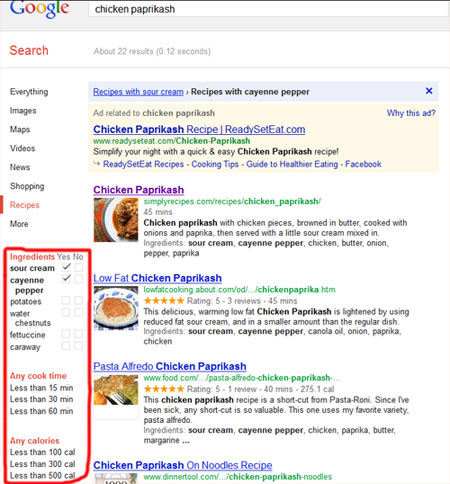
I recently discovered the super smart Google Recipes tool while searching for a recipe. Wired has some further information on it as well here. If you’ve ever wondered how to choose a recipe out of the often dizzying number of search results, this tool is for you.
Normally a user searches for terms like “chicken paprikash recipe” and google displays the, in this case 19,300 results. The recipe tool allows the user to drill down further by providing a list of common ingredients to check off in the left sidebar thereby refining results. For example, the Chicken Paprikash recipe search displays sour cream, caraway, dill, canola, cayenne pepper and white wine as check boxes in the sidebar. I check off sour cream and cayenne pepper, so it revises the search down to 22 recipe results. Additionally, the sidebar allows you to choose recipes based on cook times and calories. It’s not necessary to check off ingredients if you simply want to search by calories or cook times. Here by the way is a great Chicken Paprikash recipe I’ve used.
This function debuted more than a year ago but it’s new and helpful to me and hopefully helpful to you as well. You can access it simply by typing in your search in google and look at the left sidebar. Google itself also has some instruction to make the most of the tool. See screenshot below.